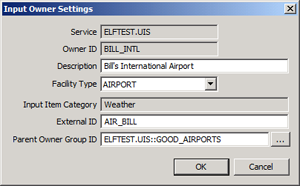
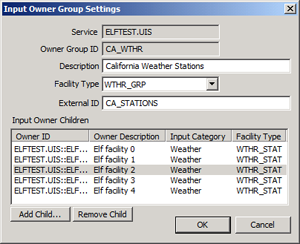
Use the Input Owner/Input Owner Group Settings dialog box to configure or override the settings for the selected input owner or input owner group.
To Configure Input Owner/Input Owner Group Settings
|
|
|
| Input Owner Settings | Input Owner Group Settings |
The properties on the Input Owner/Input Owner Group Settings dialog boxes are described below.
| Parameter | Description |
|---|---|
|
Service |
The CVS where the input owner or input owner group is maintained. The default value is the UIS that is hosting the ELF driver instance. |
|
Owner ID/Owner Group ID |
Specifies the ID of the associated input owner or input owner group. |
|
Description |
Specifies the input owner or input owner group Description value associated with the input owner or input owner group provided in the import file or entered manually. The specific facility attribute used to store this value is configured on the System Settings page. See Configuring Facility Attribute Settings. |
|
Facility Type |
Specifies the CygNet Facility Type for this input owner or input owner group. Facility Types are configured on the System Settings page. |
|
Input Item Category (Input Owner only) |
Specifies the Input Item Category to which this input owner belongs. |
|
External ID |
Specifies the unique external ID value provided in the import file that links to this CygNet input owner or input owner group facility record. The specific facility attribute used to store this value is configured on the System Settings page. See Configuring Facility Attribute Settings. |
|
Parent Owner Group ID |
Specifies the facility attribute that will store the resolved CygNet Facility Tag referenced by the external input owner Group ID value provided in the import file or the configured CygNet Facility Tag entered manually for this input owner or input owner group. The specific facility attribute used to store this value is configured on the System Settings page. See Configuring Facility Attribute Settings. Click … to select a Facility ID. |
|
Input Owner Children (Input Owner Group only) |
For Input Owner Group Settings, a list of the input owner children is displayed. Columns include the Owner ID, Owner Description, Input Category, and Facility Type. |
|
Add Child (Input Owner Group only) |
Click Add Child to select a Facility ID to add to the input owner group. |
|
Remove Child (Input Owner Group only) |
Clink Remove Child to remove a selected Facility ID from the input owner group. |

|
|
|

